Creating a Winter Wonderland: A Practical Guide to the Village Church SVG
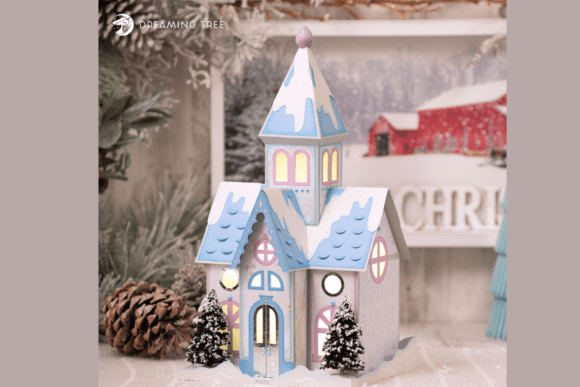
There is a distinct quietude that defines the holiday season, a sense of peace that often gets lost in the rush of commercial preparations. Bringing that peaceful spirit into your home through crafting allows you to reclaim that calm. The Village Church SVG is more than just a digital file; it is an invitation to create a centerpiece that embodies winter charm. This 3D paper church, with its snowy rooftops, arched windows, and frosted trees, offers a tangible way to decorate your mantel or holiday village. However, moving from a digital download to a physical, glowing masterpiece requires attention to detail. Many crafters stumble not because they lack skill, but because they overlook the nuances of paper selection, machine calibration, and assembly logic.
Understanding the Design Potential
Before you send the first cut command, it is vital to understand what makes this specific design unique. Unlike flat silhouettes, this project relies on layering to create depth. The pastel blue and pink color palette, combined with a detailed steeple, creates a soft, inviting aesthetic rather than a stark, traditional look. The design features glowing lights intended to shine from within, which means transparency and light diffusion are key elements of the final presentation. When you receive the Village Church SVG, you are getting a file optimized for 12x12 cutting machines, along with a PDF legend. This legend is your roadmap. Ignoring it is the first common mistake beginners make. The legend helps you identify pieces and assign colors correctly, ensuring that the "stone" walls do not accidentally get cut from "sky" cardstock, which would ruin the structural integrity and visual contrast of the build.
Mistake 1: Underestimating Cardstock Weight and Texture
A frequent error in 3D papercraft is using standard printer paper or lightweight cardstock for structural components. The supply list for this project calls for nine sheets of 12x12 stone cardstock and two sheets of sky cardstock. These are not arbitrary choices. Stone cardstock typically has a heavier weight and a textured finish that mimics masonry. If you substitute this with smooth, lightweight paper, the church walls may bow or fail to hold the shape of the 3D structure. Furthermore, the visual appeal relies on the texture. Smooth paper reflects light differently, often looking flat and cheap under the internal lighting.
The Better Approach: Stick to the recommended 65lb to 80lb cardstock for the main structure. For the decorative elements like the frosted trees and snowy rooftops, you can use slightly lighter weights if necessary, but ensure they are opaque enough to hide the internal LED wires. Always test a small cut piece first to see how the paper handles folding and gluing. If the fibers tear easily when folded, the paper is too brittle for this project.
Mistake 2: Ignoring the Glitter and Pattern Paper Placement
The design includes white glitter paper and damask pattern paper. A common misunderstanding is treating these as interchangeable with solid colors. Glitter paper is notoriously difficult to cut cleanly if the blade is dull or the speed is too high. More importantly, glitter paper sheds. If you place glitter pieces on the interior where they will be handled frequently during assembly, you will end up with glitter embedded in your glue and on your workspace, creating a mess that distracts from the crafting experience.
Additionally, the damask pattern paper adds subtle elegance to specific areas, likely the base or interior lining. Placing patterned paper on the exterior roof sections might clash with the clean, snowy aesthetic of the white glitter snow caps. The visual hierarchy matters. The glowing lights should shine through the arched windows, not be obscured by heavy patterns.
The Better Approach: Reserve glitter paper for static, exterior accents like snow piles or roof edges where shedding is less problematic and visual impact is highest. Use the damask paper for interior linings or the base platform, where it adds depth without competing with the primary architectural details. Always cut glitter paper with a fresh blade and use a light grip mat to prevent tearing.
Mistake 3: Overlooking the Importance of the Video Tutorial
Many experienced crafters skip instructional videos, assuming they can figure out the assembly from the PDF legend alone. While the legend identifies pieces, it does not demonstrate technique. The Village Church SVG comes with a step-by-step video tutorial for a reason. Assembly involves precise folding scores and tab placements. Missing a single fold direction can result in panels that face inward instead of outward, forcing you to dismantle hours of work. The video also demonstrates how to install the lighting system, which is crucial for achieving that warm, inviting glow.
The Better Approach: Watch the entire video before cutting a single sheet. Take notes on tricky folds or specific glue types recommended. Pause the video at each major stage to compare your progress. This proactive approach saves time and reduces frustration, ensuring that the final dimensions—approximately 16” H x 8.75” W—match the intended design.
Mistake 4: Incorrect Machine Settings for Intricate Details
The arched windows and detailed steeple require precise cuts. Using default settings for "Cardstock" might be too aggressive or too gentle, depending on your machine and material brand. Too much pressure can cut through the mat or distort the paper; too little leaves uncut tabs that tear when removed. This affects the usability of the pieces and the cleanliness of the final edges. Ragged edges are visible, especially when the interior lights are on, breaking the illusion of a pristine winter scene.
The Better Approach: Perform a test cut on a scrap piece of the exact cardstock you plan to use. Adjust the pressure and speed settings until the cut is clean but the mat is not damaged. For intricate details like the window tracery, consider using a fine-point blade and slowing down the cut speed. This ensures that every delicate arch and frost detail is perfectly defined.
Checking Your Workspace and Tools
Before beginning, ensure your workspace is organized. You will be handling small pieces, glue, and potentially fragile glitter paper. A cluttered desk leads to lost pieces and accidental glue smudges. Have tweezers ready for placing small tabs and a bone folder for crisp creases. The PDF legend is handy, but keep it open on a tablet or printed large enough to read easily without straining. Verify that your cutting mat is clean and free of debris from previous projects, as any lump can cause uneven cuts.
Final Thoughts on Execution
Creating this Village Church SVG is a rewarding process that results in a beautiful holiday decoration. By avoiding common pitfalls related to material selection, assembly technique, and machine settings, you ensure a high-quality finish. The key is patience and preparation. Respect the design’s complexity by following the provided resources—the PDF legend and video tutorial. When you take the time to choose the right stone and sky cardstocks, handle glitter paper with care, and calibrate your machine properly, the result is a stunning, glowing centerpiece that captures the serene spirit of the season. Whether for your own home or as a gift, this project stands out when executed with attention to detail.