Adorable Easter Bunny Boxes for Your Treats
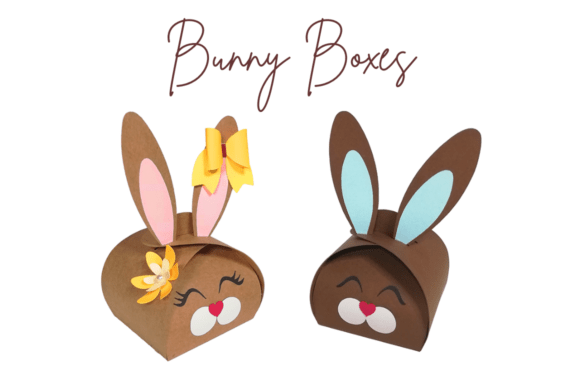
There is a specific kind of magic that happens when you hand someone a gift that looks like it was crafted with care rather than pulled from a mass-produced assembly line. As the season shifts and pastel colors begin to dominate store shelves, the search for meaningful ways to share sweets intensifies. This is where Easter Bunny Boxes come into play. These aren't just containers; they are part of the gift itself. Designed with an adorable bunny shape on the front and charming details like little paws and a fluffy tail on the back, these boxes transform standard chocolate bars or homemade treats into a memorable experience. Whether you are a parent looking to delight your children, a small business owner aiming to elevate your brand, or a hobbyist eager to try a new crafting technique, understanding how to leverage these designs can change your approach to holiday gifting.
At their core, these boxes are paper engineering projects made accessible through digital cutting files. The concept is simple: take a flat sheet of cardstock, cut and score it according to a pattern, and fold it into a three-dimensional character. However, the value they offer varies significantly depending on who is holding the scissors—or the cutting machine. For a beginner, the primary draw is the ease of use. The included tutorial guide in PDF format breaks down the process into manageable steps, often linking to video demonstrations that show exactly how the folds should look. This lowers the barrier to entry, allowing someone with zero prior experience to produce a professional-looking result in minutes.
Why Different Creators Care About This Project
The appeal of Easter Bunny Boxes stretches far beyond the immediate joy of assembling them. Different audiences evaluate this project through unique lenses, prioritizing different aspects of the workflow and the final product.
For the busy parent or educator, time and reliability are paramount. You might be organizing a classroom party or preparing treat bags for a neighborhood hunt. In this context, the ability to produce multiple units quickly without sacrificing quality is the main goal. The file options provided cater directly to this need. If you own a Cricut Joy, the 5-part box cut option allows you to use varying colors for different sections—perhaps pink ears and a white face—without the hassle of weeding complex single-layer designs. Alternatively, the single-part box cut streamlines the process for speed. The built-in dotted lines are a game-changer here; if you lack a dedicated scoring tool, the machine does the work for you, ensuring crisp folds every time. This flexibility means you can focus on filling the boxes with chocolates rather than struggling with the construction.
On the other hand, a small business owner or entrepreneur views these boxes as a branding opportunity. Packaging is often the first physical touchpoint a customer has with a product. Handing over a generic plastic bag feels transactional, but presenting a handmade bunny box feels personal and premium. For this audience, the commercial value and presentation are the driving factors. The ability to choose between solid lines (for use with a scoring tool) ensures that high-volume production maintains a polished, sharp edge. Furthermore, the availability of files for various machines—SVG for Silhouette Designer, DXF for Basic Edition, and FCM for ScanNCut—means that regardless of your equipment investment, you can maintain consistency in your product line. A chocolatier could use these to package limited-edition truffles, charging a premium not just for the candy, but for the delightful unboxing experience.
Tailoring the Experience to Your Skill Level
One of the most inclusive aspects of this project is how it adapts to your skill level. Beginners often fear that digital crafting requires expensive tools or advanced technical knowledge. This project dispels that myth by offering a structured learning path. The "TUTORIAL" guide serves as a mentor, walking you through your first steps. It explains not just how to cut, but why certain folds matter for structural integrity. As you assemble your first box, you learn about grain direction, adhesive placement, and tension—fundamental skills that translate to countless other paper crafts.
Conversely, experienced crafters and professionals look for flexibility and creativity. They don't just want to follow instructions; they want to modify them. The inclusion of four distinct file options within the SVG download speaks directly to this desire for control. An advanced user might take the 5-part cut files to create a gradient effect using ombre cardstock, or mix patterns to create a patchwork bunny. They might ignore the pre-scored lines entirely, opting to hand-score heavy-weight cardstock for a more rigid, durable box intended for shipping. For these users, the file formats (SVG, DXF, FCM) represent raw material to be manipulated, not just a final destination.
- Hobbyists appreciate the seasonal relevance and the satisfaction of making something tangible. It's a low-stakes way to engage with a new machine or practice a technique.
- Marketers and Bloggers see content potential. Creating a "how-to" video or a photo series featuring these boxes can drive engagement, as visual, seasonal content performs exceptionally well on social platforms.
- Consumers who may not craft themselves still benefit indirectly, as the availability of such designs encourages local artisans to create unique gifts that stand out in the marketplace.
Making the Right Choice for Your Needs
Deciding whether Easter Bunny Boxes are right for you comes down to identifying your primary goal. Are you looking for a quick activity to do with kids on a rainy afternoon? Then the ease of assembly and the fun factor of the bunny tail are your priorities. Ensure you have the PDF tutorial handy and perhaps opt for the version with built-in dotted lines to minimize setup time.
If your goal is to launch a micro-business selling Easter treats, your focus shifts to cost-efficiency and scalability. You will want to calculate the cost per unit of cardstock versus the perceived value of the packaging. Here, the ability to cut multiple boxes from a single mat using the optimized layouts in the SVG files becomes critical. The professional finish achieved by using solid lines and a scoring tool can justify a higher price point for your goods.
It is also worth considering the long-term usefulness of the files. While designed for Easter, the underlying structure of a character-based box can inspire year-round creations. Once you understand the mechanics of how the ears lock into the head or how the base supports the weight of the contents, you can apply those principles to Halloween pumpkins, Christmas reindeer, or even custom mascot boxes for corporate events. The investment in learning how to use these files pays dividends beyond a single holiday.
Ultimately, the beauty of these bunny-shaped boxes lies in their versatility. They bridge the gap between digital convenience and analog creativity. Whether you are using a Cricut Joy on your kitchen counter or a commercial cutter in a workshop, the end result is a vessel for connection. In a world increasingly dominated by digital interactions, handing someone a physical object that required thought, effort, and a bit of folding magic carries a weight that no email or text message can match. By choosing the right file format for your tools and approaching the project with your specific goals in mind, you turn a simple sheet of paper into a cherished memory.